<?xml version="1.0" encoding="utf-8"?><feed xmlns="http://www.w3.org/2005/Atom" xml:lang="de"><generator uri="https://jekyllrb.com/" version="3.10.0">Jekyll</generator><link href="https://www.itnotes.de/feed.xml" rel="self" type="application/atom+xml" /><link href="https://www.itnotes.de/" rel="alternate" type="text/html" hreflang="de" /><updated>2026-09-26T22:39:20+00:00</updated><id>https://www.itnotes.de/feed.xml</id><title type="html">ITNotes</title><subtitle>Informatik-Themen kurz notiert oder ausführlich festgehalten</subtitle><entry><title type="html">Machine Learning Prague Conference Recap</title><link href="https://www.itnotes.de/machine/learning/ml/artificial/intelligence/2017/04/24/mlprague/" rel="alternate" type="text/html" title="Machine Learning Prague Conference Recap" /><published>2017-04-24T00:00:00+00:00</published><updated>2017-04-24T00:00:00+00:00</updated><id>https://www.itnotes.de/machine/learning/ml/artificial/intelligence/2017/04/24/mlprague</id><content type="html" xml:base="https://www.itnotes.de/machine/learning/ml/artificial/intelligence/2017/04/24/mlprague/"><![CDATA[<p>Last weekend happened the second “Machine Learning Prague” conference and I was lucky enough to was one of the attendees.
I’d like to recap what I learned and my experiences in this blog post. I hope this is helpful to anyone who couldn’t attend and it helps me to remember.</p>

<p>The first thing which impressed myself was the amazing location. It happened at the Lucerna Cinema in Prague; for whom doesn’t know what I’m talking about just have a look at the <a href="https://goo.gl/photos/atdWtMWyW7KyNRhdA">pictures</a>.</p>

<p>Overall it was very well organized and they improved things even while the event happened. For instance on the first day there wasn’t enough space to have proper lunch but this was different on the second day by opening an additional room. Well done! Speaking of food: as at most of the developer / computer science conferences there was plenty and good food, coffee and drinks. Yummy.</p>

<p>But surly I wasn’t attending because of food and drinks. Talkwise there was a big variety in terms of topics but sadly there wasn’t a big diversity in terms of gender. There were apparently many more men talking than women. Surprisingly to me especially because I had the feeling that the proportion of women attended the conference was pretty high compared what I’ve seen at developer conferences so far. So I’m convinced to see more women on stage next year.</p>

<blockquote class="twitter-tweet" data-partner="tweetdeck"><p lang="en" dir="ltr">We have more than 500 people from 43 countries at <a href="https://twitter.com/MLPrague">@mlprague</a>. It&#39;s gonna be great! <a href="https://t.co/qvwnqEtumJ">pic.twitter.com/qvwnqEtumJ</a></p>&mdash; Jiří Materna (@JiriMaterna) <a href="https://twitter.com/JiriMaterna/status/855713178545737728">April 22, 2017</a></blockquote>
<script async="" src="//platform.twitter.com/widgets.js" charset="utf-8"></script>

<p>Since there where too many talks as I can write up in a reasonable time I will only pick some I was particular excited. Please bear with me in case I skipped yours.</p>

<h3 id="vertical-ai-solving-full-stack-industry-problems-that-require-subject-matter-expertise-unique-data-and-a-product-that-uses-ai-to-deliver-its-core-value-proposition">Vertical AI: Solving full-stack industry problems that require subject matter expertise, unique data, and a product that uses AI to deliver its core value proposition</h3>

<p>By Bradford Cross, DCVC (USA). This talk inspired me a lot. He mentioned that engineers tend to apply the engineering knowledge first to their very own craft. This seems to me somehow true and at the same time it’s an opportunity to change it. Bringing engineering / science mindsets to a variety of industries will help to add another dimension to see things from a totally different angle.</p>

<p>The only problem I see in this path is that in my feeling only tech companies appreciate the value of engineers and scientists enough and therefore a lot of companies don’t have engineers at c-level. My personal assumption is that companies with people having an engineering/science background in the c-level will overcome the competition in the long run because they making use of more advanced technology and science. But this are just my personal thoughts and where not part of the talk.</p>

<h3 id="data-science-at-the-new-york-times">Data Science at The New York Times</h3>

<p>By Chris Wiggins, New York Times (USA) – my personal favorite. He gave good general advice and was inspiring at the same time. For example he mentioned that they integrated their Machine Learning tool as slack bot. With it you get the power of ML to marketies and journalists without friction. Here a selection of tweets which reflect very well what I mean:</p>

<blockquote class="twitter-tweet" data-partner="tweetdeck"><p lang="en" dir="ltr">Data science at The New York Times or &quot;Every publisher is now a startup&quot;. <a href="https://twitter.com/hashtag/mlprague?src=hash">#mlprague</a> <a href="https://t.co/fNps2D4EDH">pic.twitter.com/fNps2D4EDH</a></p>&mdash; Kateřina Veselovská (@kveselovska) <a href="https://twitter.com/kveselovska/status/855695156581945345">April 22, 2017</a></blockquote>
<script async="" src="//platform.twitter.com/widgets.js" charset="utf-8"></script>

<blockquote class="twitter-tweet" data-partner="tweetdeck"><p lang="en" dir="ltr"><a href="https://twitter.com/chrishwiggins">@chrishwiggins</a> <a href="https://twitter.com/hashtag/mlprague?src=hash">#mlprague</a> descriptive, predictive, prescriptive -&gt; use the language people get :) <a href="https://t.co/eKlB2yPxmF">pic.twitter.com/eKlB2yPxmF</a></p>&mdash; Andrej Danko (@DankoAndrej) <a href="https://twitter.com/DankoAndrej/status/855693933007040513">April 22, 2017</a></blockquote>
<script async="" src="//platform.twitter.com/widgets.js" charset="utf-8"></script>

<h3 id="microsoft-cognitive-toolkit-fast-and-furious">Microsoft Cognitive Toolkit: fast and furious</h3>

<p>By Willi Richert, Microsoft (DE). MCT seems to be a good tool in anyones belt so give it a try and figure out for yourself if it’s helpful for your particular need or not. The talk itself gave a basic overview what I personally liked.</p>

<blockquote class="twitter-tweet" data-partner="tweetdeck"><p lang="en" dir="ltr">Willi Richert <a href="https://twitter.com/derpapst">@derpapst</a> presenting the  <a href="https://twitter.com/Microsoft">@Microsoft</a> Cognitive Toolkit <a href="https://twitter.com/hashtag/deeplearning?src=hash">#deeplearning</a> framework at <a href="https://twitter.com/hashtag/MLPrague?src=hash">#MLPrague</a> <a href="https://twitter.com/hashtag/machinelearning?src=hash">#machinelearning</a> <a href="https://t.co/TumTUzwHfQ">pic.twitter.com/TumTUzwHfQ</a></p>&mdash; Tom Lidy (@LidyTom) <a href="https://twitter.com/LidyTom/status/855754161081774080">April 22, 2017</a></blockquote>
<script async="" src="//platform.twitter.com/widgets.js" charset="utf-8"></script>

<h3 id="predicting-short-term-profit-on-us-stocks-by-multiple-ml-methods">Predicting short term profit on US stocks by multiple ML methods</h3>

<p>By Michal Illich, Wikidi (CZ). This talk had an unexpected twist for a machine learning conference. But I think it was even a good thing to show that there is still more than machine learning what solves problems. He made a good point and hearing the story about the path they went was very worth to listen.</p>

<blockquote class="twitter-tweet" data-partner="tweetdeck"><p lang="en" dir="ltr">Funny slide especially at a machine learning conference. <a href="https://twitter.com/hashtag/MLPrague?src=hash">#MLPrague</a> <a href="https://t.co/5ql1rg1VUh">pic.twitter.com/5ql1rg1VUh</a></p>&mdash; Simon Dittlmann (@SimonDittlmann) <a href="https://twitter.com/SimonDittlmann/status/855724799418650624">April 22, 2017</a></blockquote>
<script async="" src="//platform.twitter.com/widgets.js" charset="utf-8"></script>

<h3 id="serving-a-billion-personalized-news-feeds">Serving a billion personalized news feeds</h3>

<p>By Lars Backstrom, Facebook (USA). Since Facebook has both a big variety of data per person and a lot in total I was looking forward to get some insights what they are doing. He explained briefly the journey they made from decision trees to neuronal networks. I’d liked the talk very much.</p>

<blockquote class="twitter-tweet" data-partner="tweetdeck"><p lang="en" dir="ltr">Lars Backstrom from <a href="https://twitter.com/facebook">@Facebook</a> explaining how they rank new stories for users on facebook using <a href="https://twitter.com/hashtag/machinelearning?src=hash">#machinelearning</a> at <a href="https://twitter.com/hashtag/MLPrague?src=hash">#MLPrague</a> <a href="https://twitter.com/hashtag/AI?src=hash">#AI</a> <a href="https://t.co/D8K9EKiVPn">pic.twitter.com/D8K9EKiVPn</a></p>&mdash; Tom Lidy (@LidyTom) <a href="https://twitter.com/LidyTom/status/855756368023867393">April 22, 2017</a></blockquote>
<script async="" src="//platform.twitter.com/widgets.js" charset="utf-8"></script>

<p>And one funny exploration…</p>

<blockquote class="twitter-tweet" data-partner="tweetdeck"><p lang="en" dir="ltr">Serving a billion personalized news feeds <a href="https://twitter.com/hashtag/mlprague?src=hash">#mlprague</a><br />Facebook looking at your data can predict chance your relationship end in next 60 days. <a href="https://t.co/tEvUhhpwiU">pic.twitter.com/tEvUhhpwiU</a></p>&mdash; Kamil Krzyk (@F1sherKK) <a href="https://twitter.com/F1sherKK/status/855760090690981889">April 22, 2017</a></blockquote>
<script async="" src="//platform.twitter.com/widgets.js" charset="utf-8"></script>

<h3 id="neuron-soundware">Neuron soundware</h3>

<p>By Martin Krivanek (Neuron soundware). “We use IoT devices to listen for the sound of industrial machines and use deep learning and power of neural networks to recognize their failures.” Nothing more to add besides that this is really a cool idea.</p>

<blockquote class="twitter-tweet" data-partner="tweetdeck"><p lang="en" dir="ltr">Using sounds to determine problems of machines like for example elevators. Great idea. <a href="https://twitter.com/hashtag/MLPrague?src=hash">#MLPrague</a> <a href="https://t.co/xcZREOngBA">pic.twitter.com/xcZREOngBA</a></p>&mdash; Simon Dittlmann (@SimonDittlmann) <a href="https://twitter.com/SimonDittlmann/status/855787484256579585">April 22, 2017</a></blockquote>
<script async="" src="//platform.twitter.com/widgets.js" charset="utf-8"></script>

<h3 id="the-road-towards-chat-automation-starts-with-humans">The road towards chat automation starts with humans</h3>

<p>By Janos Szabo (Chatler). “How human chat agents can help chatbots to get smarter, and how ML can help human chat agents to be more productive.” Since chat bots aren’t as good as humans when it comes to customer service yet it’s definitely a good idea to combine the best of both worlds. Not sure if Chatler is the best product doing this but certainty the idea it reasonable.</p>

<h3 id="tensorflow--deep-learning">TensorFlow &amp; Deep Learning</h3>

<p>By Yufeng Guo, Google (USA). Tensorflow is so famous lately of course there has to be a slot for it. Good overview, thank you Guo!</p>

<h3 id="creating-adaptive-worlds-where-people-experience-imagination">Creating adaptive worlds where people experience imagination</h3>

<p>By Maria Vircikova, Matsuko (SK).</p>

<blockquote class="twitter-tweet" data-partner="tweetdeck"><p lang="en" dir="ltr">Interesting talk by <a href="https://twitter.com/marivirci">@marivirci</a> from <a href="https://twitter.com/hashtag/Matsuko?src=hash">#Matsuko</a> about virtual-hologram friend, want one right now :) <a href="https://twitter.com/hashtag/MLPrague?src=hash">#MLPrague</a> <a href="https://t.co/I0LX1BAohP">https://t.co/I0LX1BAohP</a> …</p>&mdash; Lubomír Šerý (@gugatr0n1c) <a href="https://twitter.com/gugatr0n1c/status/856084441680228352">April 23, 2017</a></blockquote>
<script async="" src="//platform.twitter.com/widgets.js" charset="utf-8"></script>

<h3 id="towards-good-ai">Towards Good AI</h3>

<p>By Roman Yampolskiy, University of Louisville (USA). Clearly an important topic to discuss the ethical aspects of AI and especially of Artificial General Intelligence. I remember he said something like we will have basically two options: a) we get uploaded somehow to such a system or b) we are becoming Cyborgs. In case of (a) we are loosing most of the things a human is today (eating, sex, etc) in case of (b) the system will get rid of us when it’s getting too smart. Who attaches a 486 PC to an iPhone? Nobody does. Why should a super intelligence attach a human in the long run?</p>

<p>Certainly a lot of worth points to be discussed.</p>

<blockquote class="twitter-tweet" data-partner="tweetdeck"><p lang="en" dir="ltr">&quot;Children are untrained neural networks deployed on real data.&quot; <a href="https://twitter.com/romanyam">@romanyam</a> about <a href="https://twitter.com/hashtag/AI?src=hash">#AI</a> and <a href="https://twitter.com/hashtag/security?src=hash">#security</a> and near future <a href="https://twitter.com/hashtag/MLPrague?src=hash">#MLPrague</a> <a href="https://t.co/hXBfil1V0q">pic.twitter.com/hXBfil1V0q</a></p>&mdash; Stanislav Rejthar (@s_rejthar) <a href="https://twitter.com/s_rejthar/status/856087512086958080">April 23, 2017</a></blockquote>
<script async="" src="//platform.twitter.com/widgets.js" charset="utf-8"></script>

<h3 id="deepstack-expert-level-artificial-intelligence-in-no-limit-poker">DeepStack: Expert-Level Artificial Intelligence in No-Limit Poker</h3>

<p>By Martin Schmid, IBM (CZ). Too bad for online Poker: DeepStack beat single Poker games now after years of research. Congratulations for that and thank you for sharing with us in this talk!</p>

<blockquote class="twitter-tweet" data-partner="tweetdeck"><p lang="en" dir="ltr">DeepStack team...  pretty interesting piece of research. <a href="https://twitter.com/hashtag/mlprague?src=hash">#mlprague</a> <a href="https://t.co/tgtXAjejL4">pic.twitter.com/tgtXAjejL4</a></p>&mdash; Pavel Suchmann (@bver_en) <a href="https://twitter.com/bver_en/status/856122753581273088">April 23, 2017</a></blockquote>
<script async="" src="//platform.twitter.com/widgets.js" charset="utf-8"></script>

<h3 id="multi-instance-learning-in-security">Multi-Instance Learning in Security</h3>

<p>By Tomas Pevny, Cisco (CZ). How to apply AI in network security could be seen in this talk. And analysing network traffic is in particular harder than normal AI problems because you don’t have just one vector as training set, you have multiple different ones. I have to emphasis that his Q/A session was in particular informative and a little bit funny at the same time. At least I was awake afterwards again.</p>

<blockquote class="twitter-tweet" data-partner="tweetdeck"><p lang="en" dir="ltr">Please <a href="https://twitter.com/MLPrague">@MLPrague</a> bring <a href="https://twitter.com/hashtag/TomasPevny?src=hash">#TomasPevny</a> from <a href="https://twitter.com/Cisco">@cisco</a> next year again. Great speech - fun and very informative <a href="https://twitter.com/hashtag/MLPrague?src=hash">#MLPrague</a> <a href="https://twitter.com/hashtag/multiinstancelearning?src=hash">#multiinstancelearning</a></p>&mdash; Lubomír Šerý (@gugatr0n1c) <a href="https://twitter.com/gugatr0n1c/status/856137511252496384">April 23, 2017</a></blockquote>
<script async="" src="//platform.twitter.com/widgets.js" charset="utf-8"></script>

<h2 id="summary">Summary</h2>

<p>So far so good. You can find the official schedule with all abstracts at http://www.mlprague.com/#schedule.
I hope you continue the great conference and see you next year.</p>

<blockquote class="twitter-tweet" data-partner="tweetdeck"><p lang="en" dir="ltr">&quot;We haven&#39;t actually studied how it works. It just does.&quot; 😎 <a href="https://twitter.com/hashtag/MLPrague?src=hash">#MLPrague</a> <a href="https://t.co/F1C1V0oZC3">pic.twitter.com/F1C1V0oZC3</a></p>&mdash; Ondřej Veselý (@xorwen) <a href="https://twitter.com/xorwen/status/855769560997388289">April 22, 2017</a></blockquote>
<script async="" src="//platform.twitter.com/widgets.js" charset="utf-8"></script>

<p>In the end some more ML/AI related links:</p>

<ul>
  <li><a href="http://www.mlmu.cz/">http://www.mlmu.cz/</a></li>
  <li><a href="http://www.mlmu.cz/">http://www.ceai.io/</a></li>
  <li><a href="https://www.microsoft.com/en-us/research/product/cognitive-toolkit/">https://www.microsoft.com/en-us/research/product/cognitive-toolkit/</a></li>
  <li><a href="https://www.h2o.ai/">https://www.h2o.ai/</a></li>
  <li><a href="http://ai-valley.com/">http://ai-valley.com/</a></li>
  <li><a href="https://www.knime.org/">https://www.knime.org/</a></li>
  <li><a href="http://course.fast.ai/">http://course.fast.ai/</a></li>
  <li><a href="http://cyber-valley.de/">http://cyber-valley.de/</a></li>
  <li><a href="https://www.deepstack.ai/">https://www.deepstack.ai/</a></li>
</ul>]]></content><author><name></name></author><category term="machine" /><category term="learning" /><category term="ml" /><category term="artificial" /><category term="intelligence" /><summary type="html"><![CDATA[Last weekend happened the second “Machine Learning Prague” conference and I was lucky enough to was one of the attendees. I’d like to recap what I learned and my experiences in this blog post. I hope this is helpful to anyone who couldn’t attend and it helps me to remember.]]></summary><media:thumbnail xmlns:media="http://search.yahoo.com/mrss/" url="https://www.itnotes.de/mlprague.jpg" /><media:content medium="image" url="https://www.itnotes.de/mlprague.jpg" xmlns:media="http://search.yahoo.com/mrss/" /></entry><entry><title type="html">Idea to Production - with Gitlab and Kubernetes</title><link href="https://www.itnotes.de/gitlab/kubernetes/k8s/gke/gcloud/2017/03/05/idea-to-production-with-gitlab-and-kubernetes/" rel="alternate" type="text/html" title="Idea to Production - with Gitlab and Kubernetes" /><published>2017-03-05T00:00:00+00:00</published><updated>2017-03-05T00:00:00+00:00</updated><id>https://www.itnotes.de/gitlab/kubernetes/k8s/gke/gcloud/2017/03/05/idea-to-production-with-gitlab-and-kubernetes</id><content type="html" xml:base="https://www.itnotes.de/gitlab/kubernetes/k8s/gke/gcloud/2017/03/05/idea-to-production-with-gitlab-and-kubernetes/"><![CDATA[<p>It’s 2017 and you might think continuous integration/delivery is everywhere. Sadly it’s not but with tools like Gitlab, Gitlab-CI and Kubernetes there is pretty much no excuse not to do it anymore. Think about it. The pain point to do proper continuous delivery is often to setup all the staging systems, connect them with your ticket system, connect it with your code repository and automate not even tests but basically your entire workflow – end to end. And this took you usually month – best case weeks. This’s terrifying! But Kubernetes and Gitlab are here for the rescue. It simplifies the setup so much that you can focus on your business.
{f5 lh-copy measure mt0-ns}</p>

<h2 id="overview">Overview</h2>

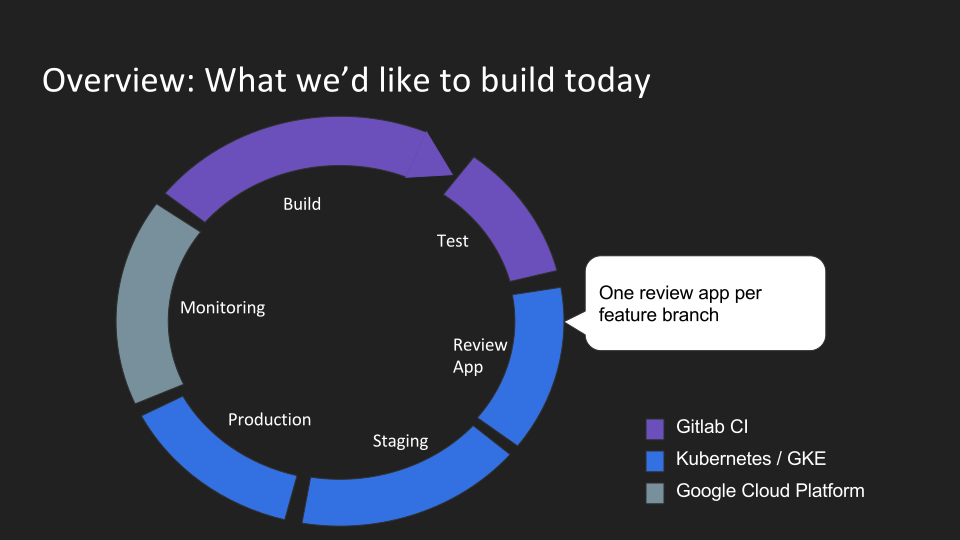
<p><a href="/assets/gitlab-kubernetes/idea_to_production_overview.svg"><img src="/assets/gitlab-kubernetes/idea_to_production_overview.svg" alt="Overview" /></a></p>

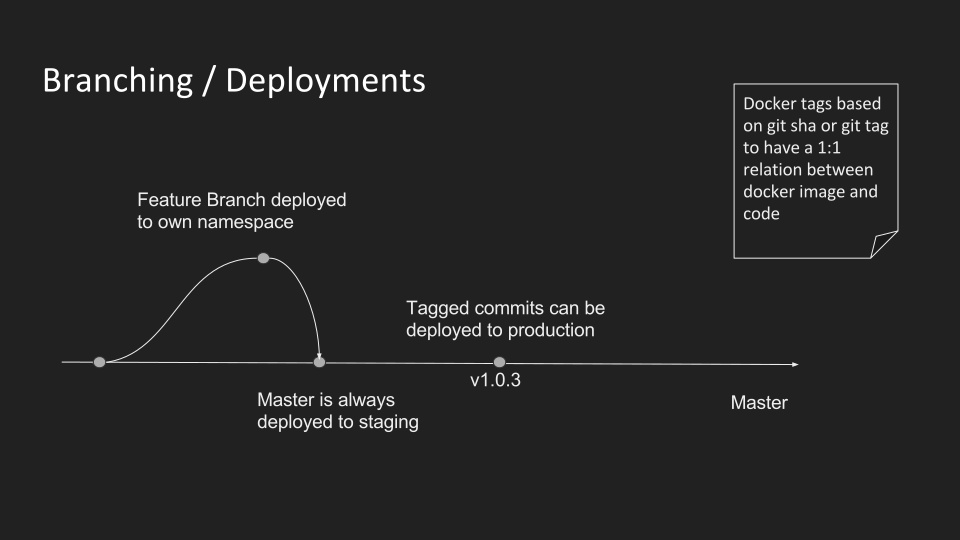
<p>We are going to build a modern delivery pipeline starting with building and unit/integration testing the software. Afterwards we will deploy the current feature branch to a new one-time staging environment. Gitlab calls this a review app. And as soon as it’s ready it will be integrated and deployed to a staging system for final integration testing. As soon as you’d like to release just tag the commit in git and the exact docker image will be tagged the same way. Finally the release is going to production and monitoring it is now the number one priority. Luckily we have <a href="https://cloud.google.com/logging/docs/">Stackdriver Logging</a> on google cloud for all log file analysis. For server/kubernetes monitoring you can use for example <a href="http://docs.datadoghq.com/integrations/kubernetes/">Datadog</a>. How the workflow looks like from a branching perspective you can see here:</p>

<p><a href="/assets/gitlab-kubernetes/idea_to_production_branching.svg"><img src="/assets/gitlab-kubernetes/idea_to_production_branching.svg" alt="Overview" /></a></p>

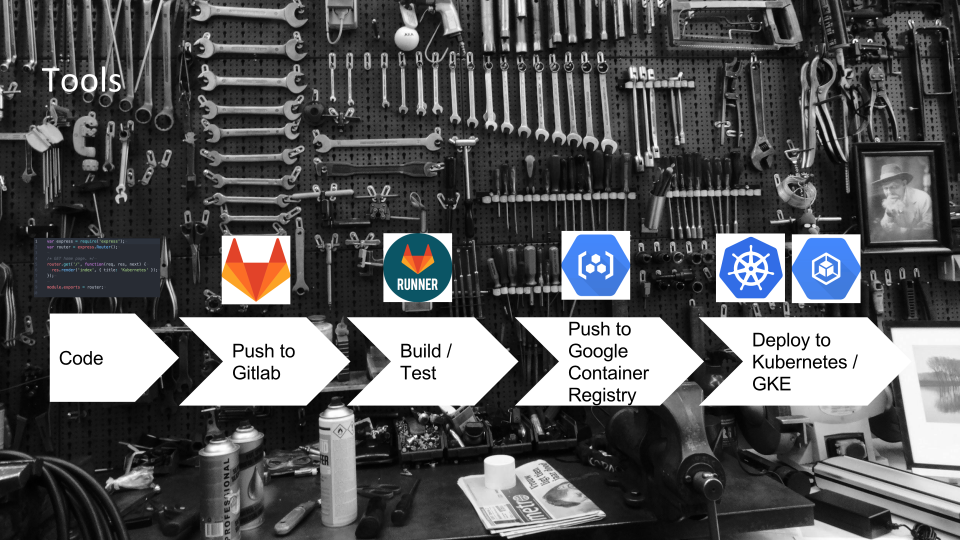
<p>And these are the tools we will use within this flow:</p>

<ul>
  <li>Gitlab: Git repository</li>
  <li>Gitlab-CI: continuous integration and deployments</li>
  <li>Google Container Registry: docker images</li>
  <li>Google Container Engine (GKE/Kubernetes): our application cluster (one or multiple clusters)</li>
  <li>Google Cloud: Logging</li>
  <li>Datadog: Performance Monitoring</li>
</ul>

<p><a href="/assets/gitlab-kubernetes/idea_to_production_tools.svg"><img src="/assets/gitlab-kubernetes/idea_to_production_tools.svg" alt="Overview" /></a></p>

<p>Enough talking. Let’s get it done. Just within the next 60 minutes.</p>

<h2 id="setup-step-by-step">Setup, step by step</h2>

<p>This step by step instructions will help you to get Google Cloud Platform, Google Container Engine (GKE/Kubernetes) up and running and wire everything with a gitlab installation – even gitlab.com.</p>

<h3 id="basis-google-cloud-platform">Basis: Google Cloud Platform</h3>

<ol>
  <li>The first thing you need to do is to create your own <a href="https://console.cloud.google.com">Google Cloud Platform Account</a>. With it you are able to use all services. Be aware you can sign-up for a trial of 60 days and with enough credits to play around. It’s free, no strings attached.</li>
  <li>After you’re logged into your fresh Google Cloud account you should start the Cloud Shell. Check the <a href="https://cloud.google.com/shell/docs/quickstart">quick-start documentation</a> if you need more assistance.</li>
  <li>Now we are ready to setup our demo application. To do so clone the following git repository <code class="language-plaintext highlighter-rouge">git clone https://github.com/Pindar/gcloud-k8s-express-app.git &amp;&amp; cd gcloud-k8s-express-app/</code></li>
  <li>Setup GCloud project <code class="language-plaintext highlighter-rouge">./k8s/gcp/setup_gcloud_project.sh [test-gitlabci-k8s-XXX]</code>. This creates a new <a href="https://cloud.google.com/resource-manager/docs/creating-managing-projects">google cloud project</a> and activates billing for you as long as you are using a German account otherwise you need to change <code class="language-plaintext highlighter-rouge">ACCOUNT_ID=${2:- ` gcloud alpha billing accounts list | grep "Mein Rechnungskonto" |  awk '{ print $1 }' ` }</code> at <a href="https://github.com/Pindar/gcloud-k8s-express-app/blob/master/k8s/gcp/setup_gcloud_project.sh#L11">https://github.com/Pindar/gcloud-k8s-express-app/blob/master/k8s/gcp/setup_gcloud_project.sh#L11</a></li>
  <li>Since you have a working Google Cloud Project the next step is to setup all required google cloud resources. In particular we need a Kubernetes cluster where we are going to deploy our application later onto. Furthermore we need a service account with restricted access to our account which is going to be used for deployments later on. To make both things as simple as possible you can just run the setup script with the project name as parameter: <code class="language-plaintext highlighter-rouge">./k8s/gcp/setup_gcloud_resources.sh [test-gitlabci-k8s-XXX]</code></li>
</ol>

<h3 id="continuous-integration-gitlab-ci">Continuous Integration: Gitlab-CI</h3>

<ol>
  <li>Register at <a href="https://gitlab.com/users/sign_in">Gitlab</a></li>
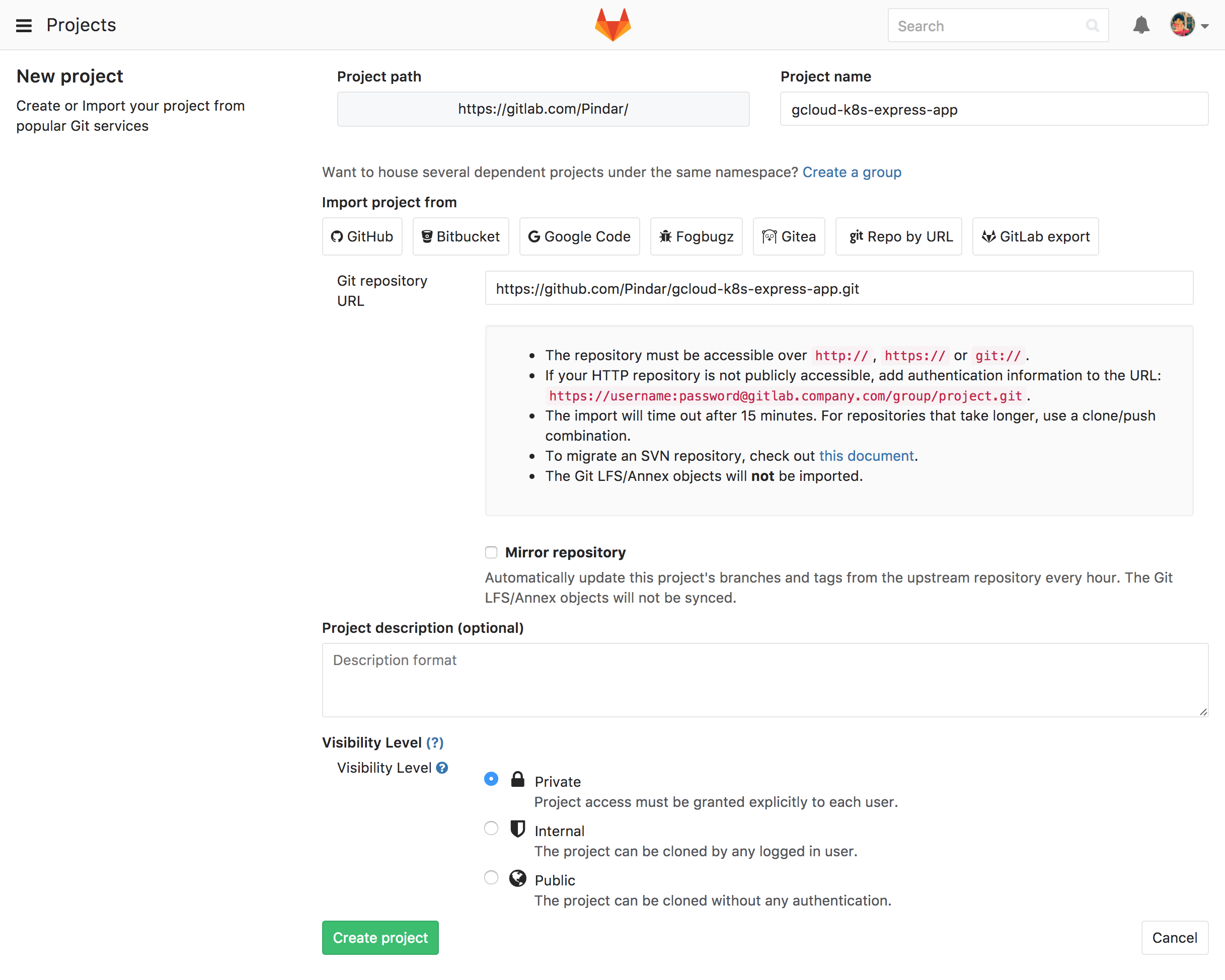
  <li>Create your own repository and clone example repository https://github.com/Pindar/gcloud-k8s-express-app.git <a href="/assets/gitlab-kubernetes/screencapture-gitlab-projects-new-1488711395727.png"><img src="/assets/gitlab-kubernetes/screencapture-gitlab-projects-new-1488711395727.png" alt="Creating a new project in GitLab" /></a></li>
  <li>Now we need to prepare Gitlab-CI. The first step is to prepare all required variables. A list is shown in the table below. To make your life easier you can run <code class="language-plaintext highlighter-rouge">create_gitlab_variables.sh [test-gitlabci-k8s-XXX]</code> where the first argument is again the google cloud project where it belongs to. For updating later on you can just call <code class="language-plaintext highlighter-rouge">update_gitlab_variables.sh [test-gitlabci-k8s-XXX]</code>. The scripts need all variables defined within a .gitlab-env file. So don’t forget to create the file before running the script!</li>
</ol>

<table>
  <thead>
    <tr>
      <th>Name</th>
      <th>Value</th>
    </tr>
  </thead>
  <tbody>
    <tr>
      <td>GCLOUD_GITLAB_CI_SERVICE_ACCOUNT_KEY</td>
      <td>output of previous step</td>
    </tr>
    <tr>
      <td>CI_REGISTRY_IMAGE</td>
      <td>eu.gcr.io/test-gitlabci-k8s-XXX/kbnw-express-app</td>
    </tr>
    <tr>
      <td>CLUSTER_NAME</td>
      <td>example-cluster</td>
    </tr>
    <tr>
      <td>GCLOUD_GITLAB_CI_SERVICE_ACCOUNT</td>
      <td>gitlab-ci-token@test-gitlabci-k8s-XXX.iam.gserviceaccount.com</td>
    </tr>
    <tr>
      <td>GCLOUD_ZONE</td>
      <td>europe-west1-b</td>
    </tr>
    <tr>
      <td>DOMAIN</td>
      <td>your domain name, e.g., example.com</td>
    </tr>
    <tr>
      <td>PROD_SUBDOMAIN</td>
      <td>your production subdomain, e.g., www for www.example.com</td>
    </tr>
    <tr>
      <td>STAGING_SUBDOMAIN</td>
      <td>your staging subdomain, e.g., citeststaging for citeststaging.example.com</td>
    </tr>
    <tr>
      <td>DOCKER_HOST</td>
      <td>to get gitlab runner working on kubernetes set it to tcp://localhost:2375</td>
    </tr>
    <tr>
      <td>GCLOUD_PROJECT</td>
      <td>google cloud project id, e.g., test-gitlabci-k8s-XXX</td>
    </tr>
  </tbody>
</table>

<p><a href="https://raw.githubusercontent.com/Pindar/gcloud-k8s-express-app/master/doc/images/gitlab_secret_variables_section.png"><img src="https://raw.githubusercontent.com/Pindar/gcloud-k8s-express-app/master/doc/images/gitlab_secret_variables_section.png" alt="GitLab CI/CD secret variables settings" /></a></p>

<ol>
  <li>If you don’t trust the shared gitlab-ci-runner on gitlab.com check out this related <a href="https://github.com/Pindar/gcloud-k8s-express-app/blob/master/k8s/gitlab-ci-runner/README.md">how-to</a> to have your own runners on your GKE/Kubernetes cluster.</li>
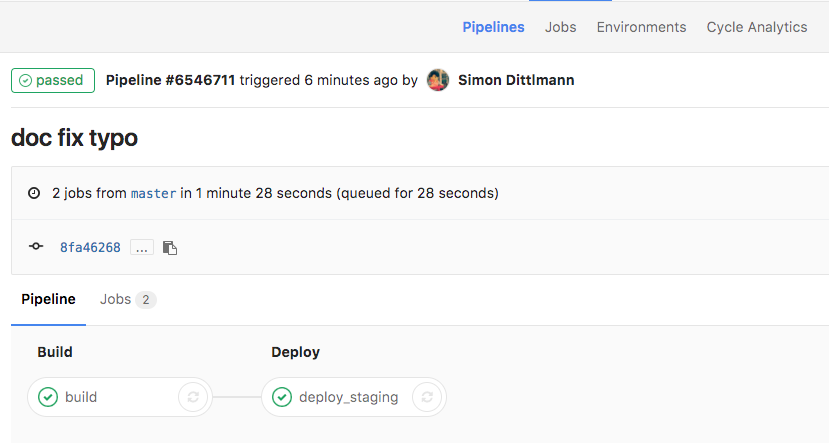
  <li>It’s done. Now you can run a build. Make a small change at any file, commit, push and see how the pipeline kicks-in. <a href="https://raw.githubusercontent.com/Pindar/gcloud-k8s-express-app/master/doc/images/gitlab_pipeline.png"><img src="https://raw.githubusercontent.com/Pindar/gcloud-k8s-express-app/master/doc/images/gitlab_pipeline.png" alt="GitLab CI pipeline running after a push" /></a></li>
</ol>

<h3 id="dns--connecting-cluster">DNS / Connecting Cluster</h3>

<ol>
  <li>As soon as master was build once there will be a ingress load balancer which is going to have the public IP address. Therefore your last setup-step is to update your DNS settings to the ingress IP you get by calling <code class="language-plaintext highlighter-rouge">kubectl --namespace=production get ing</code></li>
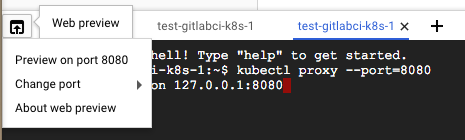
  <li>Now you can also proxy to your Cluster from your Cloud Console. First run <code class="language-plaintext highlighter-rouge">kubectl proxy --port 8080</code> and second start web preview, see <a href="https://raw.githubusercontent.com/Pindar/gcloud-k8s-express-app/master/doc/images/web_preview.png"><img src="https://raw.githubusercontent.com/Pindar/gcloud-k8s-express-app/master/doc/images/web_preview.png" alt="Google Cloud Console web preview via kubectl proxy" /></a></li>
</ol>

<p><em>In case you run it locally on your pc or mac</em></p>

<ol>
  <li>configure kubectl <code class="language-plaintext highlighter-rouge">gcloud auth application-default login &amp;&amp; gcloud --quiet container clusters get-credentials example-cluster --zone europe-west1-b &amp;&amp; export KUBERNETES_CONFIG=~/.kube/config</code></li>
  <li>[OPTIONAL] activate context <code class="language-plaintext highlighter-rouge">kubectl config get-contexts</code>, <code class="language-plaintext highlighter-rouge">kubectl config use-context [CONTEXT_NAME]</code></li>
</ol>

<h3 id="use-it">Use it</h3>

<p>Now it’s time to create an issue at gitlab. Create a branch for it starting with the issue number and do some changes. When you’re done push it to gitlab and create a merge request. You will see that Gitlab-CI will shortly afterwards start building/testing and deploying the changes as review app to your Kubernetes cluster. And as soon as you merge these changes to master and remove the feature-branch the review-app is going to tear down automatically and all the joy I was talking in the beginning is in place. Wasn’t that easy?</p>

<h3 id="clean-up">Clean up</h3>

<p>To clean everything up again afterwards just call the following scripts which are doing basically the inverts of what we have done during the setup.</p>

<p><em>kubectl config</em></p>

<ol>
  <li>Remove context; list them <code class="language-plaintext highlighter-rouge">kubectl config get-contexts</code>, remove <code class="language-plaintext highlighter-rouge">kubectl config delete-context [CONTEXT_NAME]</code></li>
  <li>Remove cluster; list them <code class="language-plaintext highlighter-rouge">kubectl config get-clusters</code>, remove <code class="language-plaintext highlighter-rouge">kubectl config delete-cluster [CLUSTER_NAME]</code></li>
</ol>

<p><em>project/resources</em></p>

<ol>
  <li><code class="language-plaintext highlighter-rouge">./k8s/teardown.sh</code></li>
  <li><code class="language-plaintext highlighter-rouge">./k8s/gcp/tear_down_gcloud_resources.sh [test-gitlabci-k8s-XXX]</code></li>
  <li><code class="language-plaintext highlighter-rouge">./k8s/gcp/tear_down_gcloud_project.sh [test-gitlabci-k8s-XXX]</code></li>
</ol>

<h2 id="summary">Summary</h2>

<p>I hope you’ve enjoyed this short blog post how to setup quickly a continuous integration/delivery pipeline with Gitlab and Kubernetes on Google Cloud Platform. If you find any bugs or have any question just write me in the comments or on twitter.</p>

<h2 id="links">Links</h2>

<ul>
  <li>Slides <a href="https://www.slideshare.net/Pindar/idea-to-production-with-gitlab-and-kubernetes">https://www.slideshare.net/Pindar/idea-to-production-with-gitlab-and-kubernetes</a></li>
  <li>Code <a href="https://github.com/Pindar/gcloud-k8s-express-app">https://github.com/Pindar/gcloud-k8s-express-app</a></li>
</ul>]]></content><author><name></name></author><category term="gitlab" /><category term="kubernetes" /><category term="k8s" /><category term="GKE" /><category term="gcloud" /><summary type="html"><![CDATA[It’s 2017 and you might think continuous integration/delivery is everywhere. Sadly it’s not but with tools like Gitlab, Gitlab-CI and Kubernetes there is pretty much no excuse not to do it anymore. Think about it. The pain point to do proper continuous delivery is often to setup all the staging systems, connect them with your ticket system, connect it with your code repository and automate not even tests but basically your entire workflow – end to end. And this took you usually month – best case weeks. This’s terrifying! But Kubernetes and Gitlab are here for the rescue. It simplifies the setup so much that you can focus on your business. {f5 lh-copy measure mt0-ns}]]></summary></entry><entry><title type="html">Physical Web and Raspberry PI 3</title><link href="https://www.itnotes.de/physical/web/raspberrypi/eddystone/ibeacon/2016/10/28/physical-web-raspberrypi3/" rel="alternate" type="text/html" title="Physical Web and Raspberry PI 3" /><published>2016-10-28T00:00:00+00:00</published><updated>2016-10-28T00:00:00+00:00</updated><id>https://www.itnotes.de/physical/web/raspberrypi/eddystone/ibeacon/2016/10/28/physical-web-raspberrypi3</id><content type="html" xml:base="https://www.itnotes.de/physical/web/raspberrypi/eddystone/ibeacon/2016/10/28/physical-web-raspberrypi3/"><![CDATA[<p>Lately I stumbled over <a href="https://developers.google.com/beacons/">Google’s Eddystone</a> protocol and how it brings the word wide web to the physical world or the other way around: how it enhances physical things with the internet. This idea is nothing new: there was/is RFID/NFC or even barcodes.
What I can see as real advantage of the <a href="https://google.github.io/physical-web/">physical web</a> compared to these other technologies is that you get contextual information without opening any app or touching a specific physical thing.</p>

<iframe width="560" height="315" src="https://www.youtube.com/embed/1yaLPRgtlR0" frameborder="0" allowfullscreen="" style="max-width: 100% !important;"></iframe>

<p>Real contextual information is possible without being disturbed by push notifications. For instance you are waiting in public office area. Now you can pick up a digital ticket just as you enter or you get finally the online self care service shown.
An other good show case might be a train station which shows you the delays etc.
Means there are plenty of opportunities!</p>

<p>The good news are you can set-up a basic physical web experiment just within minutes if you have a Raspberry PI 3 with Jessie:</p>

<ol>
  <li>Enable Bluetooth <code class="language-plaintext highlighter-rouge">sudo hciconfig hci0 up</code></li>
  <li>Advertise and not-connectable <code class="language-plaintext highlighter-rouge">sudo hciconfig hci0 leadv 3</code></li>
  <li>Generate <a href="https://github.com/google/eddystone/tree/master/eddystone-url">Eddystone URL</a> and call it http://yencarnacion.github.io/eddystone-url-calculator/
(only HTTPS target URLs are working: http -&gt; https works, https -&gt; http doesn’t)</li>
</ol>

<p><a href="https://youtu.be/gxPcPXSE_O0">How to enable Physical Web beacons on iOS</a>.</p>
<iframe width="560" height="315" src="https://www.youtube.com/embed/gxPcPXSE_O0" frameborder="0" allowfullscreen="" style="max-width: 100% !important;"></iframe>

<p>And even more information and ideas you will find in this video:</p>
<iframe width="560" height="315" src="https://www.youtube.com/embed/-kjzVB8plZE" frameborder="0" allowfullscreen="" style="max-width: 100% !important;"></iframe>]]></content><author><name></name></author><category term="physical" /><category term="web" /><category term="raspberrypi" /><category term="eddystone" /><category term="ibeacon" /><summary type="html"><![CDATA[Lately I stumbled over Google’s Eddystone protocol and how it brings the word wide web to the physical world or the other way around: how it enhances physical things with the internet. This idea is nothing new: there was/is RFID/NFC or even barcodes. What I can see as real advantage of the physical web compared to these other technologies is that you get contextual information without opening any app or touching a specific physical thing.]]></summary></entry><entry><title type="html">Responsive infrastructure - Service discovery and log shipping with docker (3)</title><link href="https://www.itnotes.de/coreos/deployment/tools/infrastructure/aws/docker/fleet/discovery/2015/06/14/service-discovery-and-log-shipping-with-docker/" rel="alternate" type="text/html" title="Responsive infrastructure - Service discovery and log shipping with docker (3)" /><published>2015-06-14T00:00:00+00:00</published><updated>2015-06-14T00:00:00+00:00</updated><id>https://www.itnotes.de/coreos/deployment/tools/infrastructure/aws/docker/fleet/discovery/2015/06/14/service-discovery-and-log-shipping-with-docker</id><content type="html" xml:base="https://www.itnotes.de/coreos/deployment/tools/infrastructure/aws/docker/fleet/discovery/2015/06/14/service-discovery-and-log-shipping-with-docker/"><![CDATA[<p>In my previous post about <a href="http://www.itnotes.de/coreos/deployment/tools/infrastructure/aws/docker/fleet/2015/04/03/how-to-setup-rsyslog-elasticsearch-kibana-on-coreos/">How to setup rsyslog, elasticsearch and kibana on CoreOS and AWS</a> I used some custom scripts in order each service discovers all the required ones. E.g. I wrote my own announcement mechanism which polluted all the systemd unit files of the services. The disadvantage of my first approach is clear: it’s mixing responsibilities.</p>

<p>In times of microservices and single responsibilities it has to be a better way to deal with it and in fact after doing some research (also talking with pkircher on the coreos IRC channel) I came up with the following:</p>

<ol>
  <li><a href="https://github.com/gliderlabs/registrator">Registrator</a> (as docker container) runs on each server once and automatically register/deregisters services for Docker containers based on published ports and metadata from the container environment.</li>
  <li><a href="https://github.com/skynetservices/skydns">SkyDNS</a> (as docker container) runs on each server once and provides DNS to discover available services.</li>
  <li><a href="https://github.com/gliderlabs/logspout">Logspout</a> (as docker container) runs also on each server once and ships docker logs to a centralized syslog server.</li>
</ol>

<p>When a service comes online the following happens:</p>

<div class="diagram">
myService-&gt;DockerDeamon: start container
Registrator--&gt;DockerDeamon: listen
Registrator-&gt;etcd: writes an entry
SkyDNS--&gt;etcd: updates dns
Logspout--&gt;DockerDeamon: read logs
</div>

<p>The big advantage with this setup is that both the service discovery and the log shipping (through logspout) are completely decoupled from the application and still everything is dockerized - no further requirements on the host.</p>

<p>The simplified elasticsearch systemd-unit file can look like this:</p>

<pre>
<code class="bash">
[Unit]
Description=ElasticSearch service
After=docker.service

[Service]
TimeoutSec=0
EnvironmentFile=/etc/environment

ExecStartPre=/usr/bin/mkdir -p /vol/data/elasticsearch
ExecStartPre=/usr/bin/docker pull dockerfile/elasticsearch

ExecStart=/bin/bash -c '\
  exec docker run \
  --name %p-%i \
  -h `hostname` \
  --publish 9200:9200 \
  --publish 9300:9300 \
  --volume /vol/data/elasticsearch:/usr/share/elasticsearch/data \
  -e SERVICE_ID=%p%i \
  -e ES_HEAP_SIZE=512M \
  --dns ${COREOS_PRIVATE_IPV4} \
  --dns-search=example.local \
  elasticsearch:1.5.2 \
  elasticsearch \
  --node.name=%p-%i \
  --cluster.name=logstash \
  --network.publish_host=${COREOS_PRIVATE_IPV4} \
  --discovery.zen.ping.multicast.enabled=false \
  --discovery.zen.ping.unicast.hosts=elasticsearch-9200.staging.example.local'

ExecStop=/usr/bin/docker stop %p-%i
ExecStop=/usr/bin/docker rm %p-%i

[X-Fleet]
Conflicts=%p@*.service
</code>
</pre>

<p>It’s just a simple reference to the unicast host of the “load balanced” skydns image route. Because one of the nice out of the box features of skydns is that it provides automatically round robin balancing of multiple registered docker-container from the same docker-image.</p>

<p><a href="https://github.com/Pindar/coreos-demo/releases/tag/v0.2">You can find the updated code about the rsyslog/elasticsearch/kibana setup on github</a>.</p>

<hr />

<p>And because I like it this is written with <a href="https://stackedit.io/">StackEdit</a>.</p>

<!-- <script>
$(".diagram").sequenceDiagram({theme: 'simple'});
</script> -->]]></content><author><name></name></author><category term="coreos" /><category term="deployment" /><category term="tools" /><category term="infrastructure" /><category term="aws" /><category term="docker" /><category term="fleet" /><category term="discovery" /><summary type="html"><![CDATA[In my previous post about How to setup rsyslog, elasticsearch and kibana on CoreOS and AWS I used some custom scripts in order each service discovers all the required ones. E.g. I wrote my own announcement mechanism which polluted all the systemd unit files of the services. The disadvantage of my first approach is clear: it’s mixing responsibilities.]]></summary></entry><entry><title type="html">Docker pipeline or Dockerize your development workflow</title><link href="https://www.itnotes.de/coreos/deployment/tools/infrastructure/docker/fleet/docker-compose/fig/2015/04/22/docker-pipeline/" rel="alternate" type="text/html" title="Docker pipeline or Dockerize your development workflow" /><published>2015-04-22T00:00:00+00:00</published><updated>2015-04-22T00:00:00+00:00</updated><id>https://www.itnotes.de/coreos/deployment/tools/infrastructure/docker/fleet/docker-compose/fig/2015/04/22/docker-pipeline</id><content type="html" xml:base="https://www.itnotes.de/coreos/deployment/tools/infrastructure/docker/fleet/docker-compose/fig/2015/04/22/docker-pipeline/"><![CDATA[<div style="width: 100%; text-align: center;">
	<img src="/assets/container_z.jpg" alt="Container" />
</div>

<p>When you containerize your applications you will find out that you can do so much more with container and in particular with docker than just running your applications. You can use docker in all stages for different purposes:</p>

<h2 id="development">Development</h2>

<ul>
  <li>prepare a docker image with all required development tools for a certain project. With it it’s easy to ramp up new team mates and keep everyone in sync.</li>
  <li>of course dockerize your application and use the dockerized version to be close to production even in the first stage. The downside is that this doesn’t work well on MacOS or Windows yet. On MacOS you can have docker running in a VM but the mounting of the host files are causing performance issues even with NFS.</li>
  <li>run your databases within a container. This makes it easy to start from predefined states when you have some import scripts prepared. One use case is to test data migrations easily.</li>
</ul>

<h2 id="continuous-integration">Continuous Integration</h2>

<ul>
  <li>use the tooling container you already have for development also on your continuous integration server. Best case you don’t need to install any other tool than docker on the host which makes all ci-jobs totally independent of each other. This is very handy if you have only one Jenkins Server but it has to run jobs for a lot of different teams.</li>
  <li>use docker-compose for continuous integration testing. With it you can for example start your application together with a dockerized database and a third container runs the end to end tests against both. As long as you have enough memory and CPU you can bring up even more complex environments. Note that you can run these tests even on open pull requests.</li>
</ul>

<h2 id="staging">Staging</h2>

<ul>
  <li>use <a href="http://kubernetes.io">Kubernetes</a>, <a href="http://coreos.com">CoreOS</a> or <a href="https://docs.docker.com/compose/">docker-compose</a> to start new environments quickly – for example one per git branch.</li>
  <li>use <a href="/coreos/deployment/tools/infrastructure/aws/docker/fleet/2015/04/03/how-to-setup-rsyslog-elasticsearch-kibana-on-coreos/">centralized application logging systems</a> like kibana or <a href="https://www.loggly.com/">loggly</a> to find bugs early. Dockerized applications can easily log to stdout and these logs can be shipped by <a href="https://github.com/gliderlabs/logspout">logspout</a> to a centralized syslog server or since docker 1.6 you can directly ship to syslog. To make the analysis simpler you should have a look at the <a href="http://cee.mitre.org/">@CEE</a> logging project.</li>
  <li>use performance logging tools for example <a href="http://datadoghq.com">datadog</a>. Consider that you need to think in layers which means you need to monitor the underlying infrastructure independently of your application layer. With a proper service discovery and an overlay network you can centralize the gathering process of all application metrics.</li>
</ul>

<h2 id="production">Production</h2>

<ul>
  <li>just use the same things as in your staging environment.</li>
</ul>

<h2 id="summary">Summary</h2>

<p>These are just a few ideas how you can use docker in your continuous delivery pipeline. A general recommendation is to have your own self-hosted private docker repository or at least a docker registry cache running to avoid problems when your third party docker-registry is unavailable. These caches are speeding up the deployment times a little bit as well and reducing the bandwidth consumption which reduces your costs a little bit too.</p>

<p><small><a href="https://www.flickr.com/photos/alessandro_tortora/9107456544/in/photolist-2UrVHv-ffC6iF-7LYpe-6BCmMw-2g7WPm-4MtokT-5o5H31-cKibz-8ffvuz-9fJb3k-7LYp8-eSN6wQ-6wxnw5-6P7h6L-7HrALP-75mqLa-fMsCgA-5MQQVH-bqtD65-4spGvX-hD812L-6BycMR-qyxTko-7vBa2x-kzLw9n-e8RuW9-4HjFTS-bMcSap-gLRa3J-7L6Kgr-qyxMwu-9AANh7-6TdaJA-deEn5b-6W7SPZ-mp184V-MtgM-e565pj-4LGK2-2g7WN7-i4r6Vs-gmkcM-bRf2oP-kKZgdV-6P7h67-9XSWct-5im4bs-2geu7-gMFuR2-bASsp6/">Photo is under creative commons</a></small></p>]]></content><author><name></name></author><category term="coreos" /><category term="deployment" /><category term="tools" /><category term="infrastructure" /><category term="docker" /><category term="fleet" /><category term="docker-compose" /><category term="fig" /><summary type="html"><![CDATA[]]></summary><media:thumbnail xmlns:media="http://search.yahoo.com/mrss/" url="https://www.itnotes.de/assets/container_z.jpg" /><media:content medium="image" url="https://www.itnotes.de/assets/container_z.jpg" xmlns:media="http://search.yahoo.com/mrss/" /></entry><entry><title type="html">Responsive infrastructure - How to setup rsyslog, elasticsearch and kibana on CoreOS and AWS (2)</title><link href="https://www.itnotes.de/coreos/deployment/tools/infrastructure/aws/docker/fleet/2015/04/03/how-to-setup-rsyslog-elasticsearch-kibana-on-coreos/" rel="alternate" type="text/html" title="Responsive infrastructure - How to setup rsyslog, elasticsearch and kibana on CoreOS and AWS (2)" /><published>2015-04-03T00:00:00+00:00</published><updated>2015-04-03T00:00:00+00:00</updated><id>https://www.itnotes.de/coreos/deployment/tools/infrastructure/aws/docker/fleet/2015/04/03/how-to-setup-rsyslog-elasticsearch-kibana-on-coreos</id><content type="html" xml:base="https://www.itnotes.de/coreos/deployment/tools/infrastructure/aws/docker/fleet/2015/04/03/how-to-setup-rsyslog-elasticsearch-kibana-on-coreos/"><![CDATA[<p>Update: <a href="http://www.itnotes.de/coreos/deployment/tools/infrastructure/aws/docker/fleet/discovery/2015/06/14/service-discovery-and-log-shipping-with-docker/">In a new blog post I describe a better way to do the service discovery part</a>.</p>

<p>Centralized logging is a key feature of a modern platform architecture. Obviously CoreOS brings some CLI tools to get logs but usually you are not in the lucky position to have only a coreos cluster running. Instead you probably have to manage a lot of different applications on different systems.</p>

<p>My goal was to setup a centralized log system quickly and without writing too many custom scripts. To achieve these two goals I tried Opsworks, Saltstack and in the end coreos. And I have to admit that the simplest approach for me was to use a coreos cluster. In this blog post I like to guide you through the setup step by step and also explain the log shipping system briefly.</p>

<p>You can find all the code on github in my <a href="https://github.com/Pindar/coreos-demo">coreos-demo project</a>.</p>

<h2 id="log-shipping-system-overview">Log shipping system overview</h2>

<p>I thought the best approach to handle a tremendously amount of log messages is to use syslog as shipping mechanism and elasticsearch together with kibana for visualization.</p>

<p><img src="/assets/log-shipping.png" alt="Log shipping overview" /></p>

<p>Each application will ship the logs to a central rsyslog server by using the syslog protocol. The good thing is that almost every application logger system supports syslog (log4j, monolog etc.). In case you have application container (container with only one application running) you can also use a separate docker container that ships the logs. The important thing is to tag each log entry for simpler log parsing in the next step. Now the central rsyslog server can do both parse each log message and forward each log message to elasticsearch. Finally you can visualize and search through the log entries with kibana.</p>

<h2 id="hands-on">Hands On</h2>

<p>Let’s setup the following:</p>

<ul>
  <li>running rsyslog service</li>
  <li>make rsyslog available through a private route53 dns entry (e.g. syslog.foobar.local)</li>
  <li>running elasticsearch cluster</li>
  <li>running kibana which points to the elasticsearch cluster</li>
  <li>make the kibana service available through a private route53 dns entry (e.g. kibana.foobar.local)</li>
</ul>

<h3 id="elasticsearch">Elasticsearch</h3>

<p>Let’s start with the elasticsearch cluster because both rsyslog and kibana depend on them. Luckily you can find an official ES image on dockerhub which means the only thing we need to do is writing the required systemd files. As reference implementation I found <a href="http://mattupstate.com/coreos/devops/2014/06/26/running-an-elasticsearch-cluster-on-coreos.html">the instructions of Matt Wright</a></p>

<p>I’m almost using Matt’s approach. Only I’m using my own <a href="https://github.com/Pindar/docker-announcement-health-service">announcement mechanism</a> which does health checking in addition and mounting the data to a different volume on the host. In the best case this volume is a EBS volume and gets attached to the instance through another service at runtime. But for simplicity I skip this part.</p>

<pre>
<code class="ini">
[Unit]
Description=ElasticSearch service
After=docker.service

[Service]
TimeoutSec=180
EnvironmentFile=/etc/environment

ExecStartPre=/usr/bin/mkdir -p /vol/data/elasticsearch
ExecStartPre=/usr/bin/docker pull dockerfile/elasticsearch

ExecStart=/bin/bash -c '\
  curl -f ${COREOS_PRIVATE_IPV4}:4001/v2/keys/announce/services/elasticsearch/logs; \
  if [ "$?" = "0" ]; then \
      PEER_PATH=$(etcdctl ls /announce/services/elasticsearch/logs | head -1); \
      UNICAST_HOSTS=$(etcdctl get $PEER_PATH | awk \'/:/ { print $2 }\' | cut -d\'"\' -f 2); \
  else \
      UNICAST_HOSTS=""; \
  fi; \
  /usr/bin/docker run \
    --name %p-%i \
    -h `hostname` \
    --publish 9200:9200 \
    --publish 9300:9300 \
    --volume /vol/data/elasticsearch:/data \
    -e ES_HEAP_SIZE=512M \
    dockerfile/elasticsearch \
    /elasticsearch/bin/elasticsearch \
    --node.name=%p-%i \
    --cluster.name=logstash \
    --network.publish_host=${COREOS_PRIVATE_IPV4} \
    --discovery.zen.ping.multicast.enabled=false \
    --discovery.zen.ping.unicast.hosts=$UNICAST_HOSTS'

ExecStop=/usr/bin/docker stop %p-%i
ExecStop=/usr/bin/docker rm %p-%i

[X-Fleet]
Conflicts=%p@*.service
</code>
</pre>

<p>Save this systemd configuration to <code class="language-plaintext highlighter-rouge">elasticsearch@.service</code> and submit it as systemd template to your CoreOS cluster by typing <code class="language-plaintext highlighter-rouge">fleetctl submit elasticsearch@.service</code>. At this point in time you can already start your elasticsearch cluster assuming your coreos cluster works and the required fleet metadata is set. Do so with <code class="language-plaintext highlighter-rouge">fleetctl start elasticsearch@1.service</code> and check the status with <code class="language-plaintext highlighter-rouge">fleetctl status elasticsearch@1.service</code>. To get the logs of our elasticsearch container you can use fleetctl again: <code class="language-plaintext highlighter-rouge">fleetctl journal elastichserach@1.service</code>.</p>

<p>Let’s announce the new service.</p>
<pre>
<code class="ini">
[Unit]
Description=ElasticSearch announce service
After=elasticsearch@%i.service
BindsTo=elasticsearch@%i.service

[Service]
EnvironmentFile=/etc/environment

ExecStartPre=-/usr/bin/docker kill elasticsearch-announce-%i
ExecStartPre=-/usr/bin/docker rm elasticsearch-announce-%i
ExecStartPre=/usr/bin/docker pull pindar/announcement-health-service

ExecStart=/bin/sh -c '\
/usr/bin/docker run \
--name elasticsearch-announce-%i \
-e SERVICE=elasticsearch \
-e THRESHOLD=5 \
-e TIMEOUT=45 \
-e ENVIRONMENT=logs \
-e NUMBER=%i \
-e HOST_IP=${COREOS_PRIVATE_IPV4} \
-e HEALTH_URL=http://${COREOS_PRIVATE_IPV4}:9200 \
-e ANNOUNCE_VALUE=\'{"IP": "${COREOS_PRIVATE_IPV4}", "PORT": "9200", "TRANSPORT_PORT": "9300" }\' \
pindar/announcement-health-service'

ExecStop=/usr/bin/docker stop elasticsearch-announce-%i

[X-Fleet]
MachineOf=elasticsearch@%i.service
</code>
</pre>

<p>Just use the same fleetctl commands as above to start the announcement service.</p>

<h3 id="elasticsearch-client-node">ElasticSearch Client node</h3>

<p>To have a <a href="http://www.elastic.co/guide/en/elasticsearch/reference/current/modules-node.html">smart load balancing for your elasticseach cluster</a> you can easily start client nodes. Afterwards you can connect kibana or rsyslog to this nodes instead of using the cluster directly.</p>

<pre>
<code class="ini">
[Unit]
Description=ElasticSearch client service
After=docker.service

[Service]
TimeoutSec=180
EnvironmentFile=/etc/environment

ExecStartPre=/usr/bin/mkdir -p /vol/data/elasticsearch
ExecStartPre=/usr/bin/docker pull dockerfile/elasticsearch

ExecStart=/bin/bash -c '\
  curl -f ${COREOS_PRIVATE_IPV4}:4001/v2/keys/announce/services/elasticsearch/logs; \
  if [ "$?" = "0" ]; then \
      PEER_PATH=$(etcdctl ls /announce/services/elasticsearch/logs | head -1); \
      UNICAST_HOSTS=$(etcdctl get $PEER_PATH | awk \'/:/ { print $2 }\' | cut -d\'"\' -f 2); \
  else \
      UNICAST_HOSTS=""; \
  fi; \
  /usr/bin/docker run \
    --name %p-%i \
    -h `hostname` \
    --publish 9200:9200 \
    --publish 9300:9300 \
    --volume /vol/data/elasticsearch:/data \
    dockerfile/elasticsearch \
    /elasticsearch/bin/elasticsearch \
    --node.name=%p-%i \
    --node.data=false \
    --node.master=false \
    --cluster.name=logstash \
    --network.publish_host=${COREOS_PRIVATE_IPV4} \
    --discovery.zen.ping.multicast.enabled=false \
    --discovery.zen.ping.unicast.hosts=$UNICAST_HOSTS'

ExecStop=/usr/bin/docker stop %p-%i
ExecStop=/usr/bin/docker rm %p-%i

[X-Fleet]
Conflicts=%p@*.service
</code>
</pre>

<p>You can find all configuration files also on my github account in the <a href="https://github.com/Pindar/coreos-demo">demo project</a> – you need two announcement services for the elasticsearch client nodes: one that announces the node in the es-cluster and one that announces the node as client node for other services.</p>

<h3 id="kibana">Kibana</h3>

<p>Let’s connect Kibana to our new elasticsearch instance. You can find a <a href="https://github.com/pindar/docker-kibana">dockerized version of kibana 4 on my github repo</a> and an automated build on <a href="https://registry.hub.docker.com/u/pindar/kibana/">dockerhub</a>.</p>

<p>To start a container from this image we need again the systemd configuration for our coreos cluster.</p>

<pre>
<code class="ini">
[Unit]
Description=Kibana logs front-end
After=elasticsearch-announce@*.service
Requires=elasticsearch-announce@*.service

[Service]
EnvironmentFile=/etc/environment
TimeoutStartSec=0
ExecStartPre=-/usr/bin/docker kill kibana
ExecStartPre=-/usr/bin/docker rm kibana
ExecStartPre=/usr/bin/docker pull pindar/kibana

ExecStart=/usr/bin/bash -c '\
curl -f ${COREOS_PRIVATE_IPV4}:4001/v2/keys/announce/services/elasticsearch-lb/logs/; \
  if [ "$?" = "0" ]; then \
      ELASTICSEARCH_ENDPOINT="http://$(etcdctl get /announce/services/elasticsearch-lb/logs/1 | awk \'/:/ { print $2 }\' | cut -d\'"\' -f 2):9200"; \
  else \
      ELASTICSEARCH_ENDPOINT=""; \
  fi; \
/usr/bin/docker run \
--name kibana \
-e ELASTICSEARCH_ENDPOINT=$ELASTICSEARCH_ENDPOINT \
-p 5601:5601 \
pindar/kibana'

ExecStop=/usr/bin/docker stop kibana

[X-Fleet]
Conflicts=kibana.service
</code>
</pre>

<p>As soon as kibana is running you can try to connect to it on port 5601 and should see the interface.</p>

<p><img src="/kibana-first-start.png" width="100%" alt="Kibana after startup" /></p>

<p>To make it more convenient to access the UI you can dynamically update your DNS server. In case you are using AWS Route53 even for private entries you can use <a href="https://github.com/Pindar/go-route53-presence">my fork</a> of an implementation that exactly does it for you. The fork was necessary because I don’t wont to remove the dns entry every time fleet moves the service because it takes some time that the entry gets visible again (TTL of the SOA).</p>

<pre>
<code class="ini">
[Unit]
Description=kibana announcement service

After=docker.service
BindsTo=kibana.service

[Service]
ExecStartPre=-/usr/bin/docker kill %p
ExecStartPre=-/usr/bin/docker rm %p
ExecStartPre=/usr/bin/docker pull pindar/go-route53-presence

ExecStart=/usr/bin/bash -c \
"/usr/bin/docker run \
--name %p \
-e AWS_ACCESS_KEY=`etcdctl get /AWS_USER_ROUTE53_KEY` \
-e AWS_SECRET_KEY=`etcdctl get /AWS_USER_ROUTE53_SECRET` \
-e ROUTE53_RECORD_NAME=logs.example.local. \
-e ROUTE53_RECORD_TYPE='A' \
-e ROUTE53_TTL=15 \
-e ROUTE53_ZONE_ID=`etcdctl get /AWS_ROUTE53_ZONE_ID` \
-e ROUTE53_IP_TYPE=private \
pindar/go-route53-presence"

ExecStop=/usr/bin/docker stop %p

[X-Fleet]
MachineOf=kibana.service
</code>
</pre>

<h3 id="rsyslog">Rsyslog</h3>

<p>The last missing piece is the rsyslog container which will handle all the shipped logs. Even for this you can find a ready to use docker image on <a href="https://registry.hub.docker.com/u/pindar/docker-rsyslog/">dockerhub</a></p>

<pre>
<code class="ini">
[Unit]
Description=Centralised RSyslog
After=docker.service

[Service]
User=core
TimeoutStartSec=0
EnvironmentFile=/etc/environment

ExecStartPre=-/usr/bin/docker kill central-rsyslog-%i
ExecStartPre=-/usr/bin/docker rm central-rsyslog-%i
ExecStartPre=/usr/bin/docker pull pindar/docker-rsyslog
ExecStartPre=/usr/bin/sudo /usr/bin/mkdir -p /vol/logs

ExecStart=/usr/bin/bash -c '\
ELASTICSEARCH_ENDPOINT="$(etcdctl get /announce/services/elasticsearch-lb/logs/1 | awk \'/:/ { print $2 }\' | cut -d\'"\' -f 2)"; \
/usr/bin/docker run \
--name central-rsyslog-%i \
-p 514:514 \
-p 514:514/udp \
-e ELASTICSEARCH_HOST=$ELASTICSEARCH_ENDPOINT \
-v /vol/logs:/var/log/remote \
pindar/docker-rsyslog'

ExecStop=/usr/bin/docker stop central-rsyslog-%i

[X-Fleet]
Conflicts=central-rsyslog@*.service
</code>
</pre>

<p>To test the round trip lookup the ip where rsyslog is running <code class="language-plaintext highlighter-rouge">fleetctl list-units</code> and connect with telnet to write your first log message.</p>

<pre>
<code class="bash">
telnet 172.17.8.101 514
Trying 172.17.8.101...
Connected to 172.17.8.101.
Escape character is '^]'.
test foobar : this is my message
^]
telnet&gt; quit
Connection closed.
</code>
</pre>

<p><img src="/kibana-log-messages.png" width="100%" alt="Kibana first log messages" /></p>

<p>Now everything is up and running – happy shipping!</p>]]></content><author><name></name></author><category term="coreos" /><category term="deployment" /><category term="tools" /><category term="infrastructure" /><category term="aws" /><category term="docker" /><category term="fleet" /><summary type="html"><![CDATA[Update: In a new blog post I describe a better way to do the service discovery part.]]></summary><media:thumbnail xmlns:media="http://search.yahoo.com/mrss/" url="https://www.itnotes.de/log-shipping.png" /><media:content medium="image" url="https://www.itnotes.de/log-shipping.png" xmlns:media="http://search.yahoo.com/mrss/" /></entry><entry><title type="html">Responsive infrastructure - or how to handle microservices with CoreOS and AWS (1)</title><link href="https://www.itnotes.de/docker/coreos/deployment/layering/infrastructure/2015/03/14/responsive-infrastructure-or-how-to-handle-microservices-with-coreos-and-aws-1/" rel="alternate" type="text/html" title="Responsive infrastructure - or how to handle microservices with CoreOS and AWS (1)" /><published>2015-03-14T19:20:00+00:00</published><updated>2015-03-14T19:20:00+00:00</updated><id>https://www.itnotes.de/docker/coreos/deployment/layering/infrastructure/2015/03/14/responsive-infrastructure-or-how-to-handle-microservices-with-coreos-and-aws-1</id><content type="html" xml:base="https://www.itnotes.de/docker/coreos/deployment/layering/infrastructure/2015/03/14/responsive-infrastructure-or-how-to-handle-microservices-with-coreos-and-aws-1/"><![CDATA[<p>This is the first part of a series of three blog articles. This first one gives a more theoretical overview about how I layer an infrastructure.</p>

<p>Recently the micro-service architecture style is growing a lot but even without such an architectural approach you probably have to run a lot of different software components in your data center to provide a simple application. Just think about what you need for a single application you might develop. Your stack could look like the following:</p>

<ul>
  <li>DNS entries</li>
  <li>IP routing</li>
  <li>firewall settings</li>
  <li>Virtual Machine / Server</li>
  <li>operating system</li>
  <li>load balancer</li>
  <li>apache/nginx</li>
  <li>tomcat with your application running</li>
  <li>database</li>
  <li>log aggregation service</li>
  <li>performance metrics</li>
</ul>

<p>This means even a simple application needs some other services to run properly. In a more classic approach you would setup all the required software once and for each deployment you would replace just your developed binary (e.g. your war file). To have a more scalable approach it’s good to start with a short planning. Let’s try to sort each of the listed pieces in one of the three following layers (<a href="http://www.thoughtworks.com/insights/blog/layering-cloud">more information</a>):</p>

<ol>
  <li>Visible (changes rarely): DNS entries, virtual machines, operating system, firewall settings, ip routing</li>
  <li>Volatile (changes often): load balancer, apache, tomcat, database software, log aggregation software, performance metrics software, internal dns</li>
  <li>Persistent (no changes): database data, log data, performance data</li>
</ol>

<p>Since we have now a clear picture which parts of the system we’d like to change more often and fast we can think about how to achieve it.</p>

<p>Let’s start with the Visible layer.</p>

<h2 id="visible-layer">Visible Layer</h2>

<p>This layer captures all pieces changing from time to time but might affect the entire system. The risk to do a change is obviously high.</p>

<p>When you are a happy AWS customer and you’d like to have your infrastructure written in code then Cloudformation is probably your friend to handle this layer. You can write and test it with a separate stack even in a continuous integration process and update your production infrastructure after all testing is done.</p>

<p>But this layer is not the one with the highest risk. You should be really scarred while doing changes on the persistent layer.</p>

<h2 id="persistence-layer">Persistence layer</h2>

<p>Almost every single application needs to persistent data in the end. Data is usually the most valuable thing for a service and that’s why it should be treated carefully. You probably do backups, never format the volume, do regular checks etc.</p>

<p>With AWS I’m using EBS volumes for this. It’s perfect because you can move the volume from one instance to another one by attaching and detaching it. In addition you can take regularly snapshots and store it to s3.</p>

<p>To process all the data we need an application which probably will change rapidly and that’s why it’s in the volatile layer.</p>

<h2 id="volatile-layer">Volatile layer</h2>

<p>This layer is for all running applications regardless of whether it’s developed by yourself or just managed. The reason why I don’t differentiate is that you might need to update your managed application because of security reason fast and without hassle. Why should it be harder to deploy a third party application then something developed by yourself?</p>

<p>To keep things simple I’m containerize everything and try to follow the single responsibility rule which means a docker container should only have one process but multiple docker container might orchestrate one single service (also called pod). With this approach it’s quite simple to update each part separately. Sadly docker has some <a href="http://containerops.org/2014/12/19/docker-vs-rocket-gimme-a-break/">downsides</a> when orchestrating a pod but since the App Container Specification addresses most of them it will be just a matter of time that either Rocket (which implements APPC) or Docker (which doesn’t implement APPC but it’s developed by so many smart people) will solve them.</p>

<p>Nevertheless a containerized application is much simpler to deploy then a traditional one which makes it also simpler to manage your volatile layer.</p>

<p>In the next blog post I will explain how I created a CoreOS cluster with ElasticSearch, Kibana and Rsyslog while following this theories.</p>]]></content><author><name></name></author><category term="docker" /><category term="coreos" /><category term="deployment" /><category term="layering" /><category term="infrastructure" /><summary type="html"><![CDATA[This is the first part of a series of three blog articles. This first one gives a more theoretical overview about how I layer an infrastructure.]]></summary></entry><entry><title type="html">CoreOS + Docker on AWS</title><link href="https://www.itnotes.de/coreos/deployment/tools/infrastructure/aws/docker/fleet/2015/02/21/coreos-on-aws/" rel="alternate" type="text/html" title="CoreOS + Docker on AWS" /><published>2015-02-21T16:50:00+00:00</published><updated>2015-02-21T16:50:00+00:00</updated><id>https://www.itnotes.de/coreos/deployment/tools/infrastructure/aws/docker/fleet/2015/02/21/coreos-on-aws</id><content type="html" xml:base="https://www.itnotes.de/coreos/deployment/tools/infrastructure/aws/docker/fleet/2015/02/21/coreos-on-aws/"><![CDATA[<p>After moving to docker half a year ago I tried a lot of different deployment/configuration tools on AWS:</p>

<ul>
  <li>Deploying pre-provisioned AMIs</li>
  <li>Deploying new instances and polling all the docker container on startup</li>
  <li>Opsworks with Docker-Chef recipes</li>
  <li>Saltstack (only as POC)</li>
  <li>Kubernetes (only as POC)</li>
</ul>

<p>Kubernetes is really nice but “Kubernetes is in pre-production beta!”. And especially it’s stated that you shouldn’t use it with a high load. Also AWS Container Service is not ready for production yet.</p>

<p>So exciting docker is it’s still a very young technology and I wanted to have a toolbox for it which is very flexible and let you deploy new software within minutes. One hard requirement to me is a easy configuration management. So I finally took a look at CoreOS again. And what I have seen so far is really nice. It focus really on “massive server deployments” and gives you all tools you need to get up and running in hours (including learning time).</p>

<p>I started my CoreOS journey with this <a href="https://coreos.com/docs/launching-containers/launching/fleet-example-deployment/">article about AWS deployments</a> . And got our entire staging system running within one day. But there are also some minor things I’d like to have before it goes to production:</p>

<ul>
  <li>blue/green deployments</li>
  <li>rolling deployments</li>
  <li>service announcement for discovery</li>
  <li>for some services a 1:1 mapping between AWS autoscaling and started container</li>
</ul>

<p>The nice thing is that the side-kick service idea let’s you do all of it with a couple of microservices. For the blue/green deployments I plan to update the port mapping on AWS ELBs. The new container will start on a different but fixed port and as soon as it’s running the ELB will be updated. The rolling one is quite simple with fleet. Just a couple of bash lines.
For the Service Announcement/discovery I started also a small micro service and it’s <a href="https://github.com/Pindar/docker-announcement-health-service">open sourced</a>. Not totally done yet but I’m working on it (pull requests are welcome).
And the hardest part is my “auto scaling”. The idea is to store the desired amount of started containers for each service in etcd. This value is checked by a microservice which starts or stops the services. While a deployment happens this is obviously paused. The desired value can then come from different sources. One might be an AWS autoscaling group; or you calculate the load based on some metrics you have in e.g. Datadog. No matter how I will open source <a href="https://github.com/Pindar/docker-coreos-autoscale-container">this little microservice soon</a>.</p>]]></content><author><name></name></author><category term="coreos" /><category term="deployment" /><category term="tools" /><category term="infrastructure" /><category term="aws" /><category term="docker" /><category term="fleet" /><summary type="html"><![CDATA[After moving to docker half a year ago I tried a lot of different deployment/configuration tools on AWS:]]></summary></entry><entry><title type="html">Mock your backend with AngularJS and Grunt (Yeoman)</title><link href="https://www.itnotes.de/anguljarjs/js/frontend/development/2014/10/03/mocked-backend-with-angularjs/" rel="alternate" type="text/html" title="Mock your backend with AngularJS and Grunt (Yeoman)" /><published>2014-10-03T00:00:00+00:00</published><updated>2014-10-03T00:00:00+00:00</updated><id>https://www.itnotes.de/anguljarjs/js/frontend/development/2014/10/03/mocked-backend-with-angularjs</id><content type="html" xml:base="https://www.itnotes.de/anguljarjs/js/frontend/development/2014/10/03/mocked-backend-with-angularjs/"><![CDATA[<p>I like to work independent of any backend implementation because of three reasons:</p>

<ol>
  <li>I don’t want to wait until the backend is implemented if I can not do it by myself</li>
  <li>I like to work offline even in trains when I have no reliable internet connection</li>
  <li>I like the speed of the JS development process without restarting huge backend systems</li>
</ol>

<p>All together ended in the idea to mock every backend call while developing JS frontends. The first time I was using this approach I was working in a big project where the frontend team had to start the implementation without any ready backend. This project was month before AngularJS was ready to use and we were working with BackboneJS and jQuery. But we got it working even with this setup and we loved the new way to work. So I’m using the same idea in my current AngularJS + Yeoman setup.</p>

<h2 id="overview">Overview</h2>

<p>The basic idea is that if you run <code class="language-plaintext highlighter-rouge">grunt serve</code> you get an offline development environment where all backend calls are mocked. But when you build your release <code class="language-plaintext highlighter-rouge">grunt</code> all backend calls are real.</p>

<h2 id="how">How</h2>

<p>I’m bootsrapping a “different” dev-AngularJS app when starting it in development mode then when starting it in production. The difference is that this dev-app uses the production app as module, uses <code class="language-plaintext highlighter-rouge">ngMockE2E</code> and <code class="language-plaintext highlighter-rouge">$httpBackend</code> to mock all backend calls.</p>

<h2 id="step-by-step">Step by step</h2>

<p>To see this steps better in a context a <a href="https://github.com/Pindar/mocked-backend-with-angularjs">demo project is available on github</a>.</p>

<p>1) Add all required packages to your package.json</p>
<pre>
<code class="json">
{
  "name": "mockedbackendwithangularjs",
  "version": "0.0.0",
  "repository": {
    "type": "git",
    "url": "https://github.com/Pindar/mocked-backend-with-angularjs.git"
  },
  "dependencies": {},
  "devDependencies": {
    ...
    "grunt-processhtml": "^0.3.3"
  },
  "engines": {
    "node": "&gt;=0.10.0"
  },
  "scripts": {
    "test": "grunt test"
  }
}
</code>
</pre>
<p>and bower.json</p>
<pre>
<code class="json">
"devDependencies": {
  "angular-mocks": "~1.2.0"
},
</code>
</pre>

<p>then call <code class="language-plaintext highlighter-rouge">npm install &amp;&amp; bower install</code></p>

<p>2) Configure grunt-processhtml. Add the following to your Gruntfile</p>
<pre>
<code class="javascript">
processhtml: {
  options: {
    commentMarker: 'process'
  },
  dist: {
    files: [
      {
        expand: true,
        cwd: '&lt;%= yeoman.dist %&gt;',
        src: ['*.html', 'views/{,*/}*.html'],
        dest: '&lt;%= yeoman.dist %&gt;'
      }
    ]
  }
}
grunt.registerTask('build', [
// ...
'processhtml',
'usemin',
'htmlmin'
]);

</code>
</pre>

<p>3) Change way the application gets bootstrapped</p>

<p>a) remove <code class="language-plaintext highlighter-rouge">ng-app="mockedBackendWithAngularjsApp"</code> from the body tag in the index.html</p>

<p>b) add the code to your app.js to bootstrap the regular app</p>
<pre>
<code class="javascript">
/**
 * @ngdoc bootstrap
 * @name mockedBackendWithAngularjsApp
 *
 */
(function () {

  if (!angular.mock) {
    angular.element(document).ready(function () {
      angular.bootstrap(document, ['mockedBackendWithAngularjsApp']);
    });
  }
})();
</code>
</pre>
<p>When you call grunt serve afterwards the app should still start.</p>

<p>c) create app-mock.js</p>
<pre>
<code class="javascript">
angular
  .module('mockedBackendWithAngularjsAppDev', ['mockedBackendWithAngularjsApp', 'ngMockE2E'])
  .run(function ($httpBackend) {
    'use strict';
    $httpBackend.whenGET(/^views\//).passThrough();
    $httpBackend.whenGET(/^res\//).passThrough();

    /* backend API calls here */
    $httpBackend.whenPOST(/^\/signup/).respond(200);
    $httpBackend.whenGET(/^\/api\/catalog\/US/).respond(200, TD.catalogUS);
    $httpBackend.whenPOST(/\/api\/\/exception\/(\S)*/).respond({});

  });
if (angular.mock) {
  angular.element(document).ready(function () {
    'use strict';
    angular.bootstrap(document, ['mockedBackendWithAngularjsAppDev']);
  });
}
</code>
</pre>

<p>d) add your mock files to ./test/mock, e.g.,</p>
<pre>
<code class="javascript">
  window.TD = window.TD || {};
  TD.catalogUS = {
    key: 'Hello World!'
  };
</code>
</pre>

<p>e) make mock files available – add folder to the livereload task in your Gruntfile</p>
<pre>
<code class="javascript">
connect().use(
  '/mock',
  connect.static('./test/mock')
),
</code>
</pre>

<p>f) wire everything together – add files to index.html</p>
<pre>
<code class="html">
<!-- vendor scripts... -->
<!-- process:remove -->
<script src="bower_components/angular-mocks/angular-mocks.js"></script>
<!-- /process -->
<!-- your production scripts -->
<!-- process:remove -->
<script src="mock/catalog-us.js"></script>
<script src="scripts/app-mock.js"></script>
<!-- /process -->
</code>
</pre>

<p>4) Implement your backend calls with <code class="language-plaintext highlighter-rouge">$http</code> as usual. You can find an example in the main.js controller in the <a href="https://github.com/Pindar/mocked-backend-with-angularjs">demo project</a>.</p>

<p><em>Enjoy your new offline development environment!</em></p>]]></content><author><name></name></author><category term="anguljarjs" /><category term="js" /><category term="frontend" /><category term="development" /><summary type="html"><![CDATA[I like to work independent of any backend implementation because of three reasons:]]></summary></entry><entry><title type="html">JSist 2014 summary</title><link href="https://www.itnotes.de/conference/js/frontend/development/2014/09/28/jsist-conference-summary/" rel="alternate" type="text/html" title="JSist 2014 summary" /><published>2014-09-28T15:08:00+00:00</published><updated>2014-09-28T15:08:00+00:00</updated><id>https://www.itnotes.de/conference/js/frontend/development/2014/09/28/jsist-conference-summary</id><content type="html" xml:base="https://www.itnotes.de/conference/js/frontend/development/2014/09/28/jsist-conference-summary/"><![CDATA[<p>Now while I’m sitting at the airport in Istanbul I think it’s a good time to note down what I learned the last two days at <a href="http://lanyrd.com/2014/jsist/">JSist</a>.</p>

<p>These two days in Istanbul were quite impressive but at the same time the weather was so unbelievable rainy that I couldn’t visit much of the city. But beside that the conference about JS was worth to come – so let’s start with Saturday.</p>

<h2 id="saturday">Saturday</h2>
<p>It was a warm welcome and the registration process was well organized so I felt myself comfortable from the first minute on. The advertised breakfast wasn’t that good but we were not traveled so far to get a good dish at the conference so I shouldn’t bother.</p>

<p>The first talk with the title “Javascript &lt;3 Unicode” by Mathias Bynens sounded a bit boring but it wasn’t at all. He pointed out all the pitfalls you will face in a daily business and this in a very entertaining talk. For example he explained the unicode plates, why a string reverse is not as simple as <code class="language-plaintext highlighter-rouge">"foo".split('').reverse().join('')</code> (try it with the unicode ‘pile of poo’) and mentioned quotes of celebrities to find the right solution. As general rule of thumb I will check the behavior of every user facing text input field regarding the unicode sign ‘pile of poo’ in the future. If this doesn’t break the app that it’s a good sign. And in addition I should mention that he pointed out even problems of MySQL (MySQL cut a string when it’s not configured in UTF-8 embec (something…) mode) and unicode what was very surprising to me.</p>

<p>The second talk was about “This is bigger than us: Building a future for Open Source” by Lena Reinhard. She did a great job by presenting such a complex and abstract theme at a JS conference in a simple an practical way. One important thing I would like to repeat is that software development needs more diversity. I guess this is so true especially since she also pointed out that only less then one percent of the world population are software engineers. So at one developer there are 399 not developers… That’s crazy when you look around and you find so many devices next to you in every second of your life.</p>

<p>The last talk before lunch was about “Scaling Node.js Applications with Redis, RabbitMQ and cote.js” by Armağan Amcalar. Because I’m personally a fan of Microservices I was super interested in this talk to hear about how others are trying to achieve this architecture goal. He talked about decoupling of node.js applications through an event driven development style across node.js applications and how this can be achieved by using for example pup/sub of Redis or Messages of RabbitMQ. In addition he mentioned cote.js – a library written by them which seems to be a more lite weight tool. But he couldn’t talk too much about it so everybody should take a look and build her/his own meaning.</p>

<p>The lunch break was big enough to even walk a bit around but sadly it was still such a bad weather that I couldn’t go around much. That’s why I will directly continue with the talk about “Getting Started with ClojureScript” by Üstün Özgür. He was pointing out all the good parts of functional programming and I have to agree with him especially because I wrote three years ago also an article printed in a magazine about functional programming methods in web development. The only thing I don’t agree is that ClojureScript is a better language then plain JS. In my opinion you can do already all the nice things directly with JS so I don’t see the point of compiling – I also haven’t seen it for CoffeeScript or GWT. The only exception is ASM.JS but this is a different topic so I will not go deeper here.</p>

<p>At 3pm “Meteor for Everyone” by Barış Güler started. It was nice to see more about this framework and what it is actually for. For me it really looks like a perfect thing for prototyping or tools with not that much expected load. I would probably use it for company internal tools for example. What I dislike is that they also invited there own ecosystem by explicitly not using NPM. Maybe it makes them faster but it’s even harder to get something like this running for production. Nevertheless the talk was enlightening.</p>

<p>“AngularJS Directives for D3JS” by Yaprak Ayazoğlu was the one talk I would have expected a bit more. She showed how you can encapsulate complicated d3.js statements within an AngularJS directive but this was it basically. Probably enough for people haven’t worked with AngularJS or d3.js previously but for me there wasn’t much new things.</p>

<p>The next talk about “Realtime MVC with Sails.js” by Serdar Doğruyol started pretty good by telling us about how easy it is to setup applications but the downside was that he didn’t shared with us any live session. I was expecting that I could at least see how easy it is to setup a hello world app. Maybe next time…</p>

<p>The talk “Ember.js Framework” by Sean Yu was more about “Why we have chosen Ember.js” than about the Framework itself. So when we rename it in our minds it was very good to hear about the decision making process of other companies how they decide which framework fit to them best. When I think about it’s one of the most important decisions you can make because probably a lot of developer will hate or love you even years after you made the decision. Beside this personal thing it can also lead to a lot of future development expense if you have made the wrong decision. That’s why I was happy to get this insights.</p>

<p>The last talk of the first day was “Hardware Development for JavaScript Developers” by Tarık Keleştemur. He did a great job presenting a way how to use JavaScript and an arduino. Even some small practical examples he showed us on stage what was really a cool thing.</p>

<p>The evening I shared with friends but it was still rainy and very windy…</p>

<h2 id="sunday">Sunday</h2>
<p>Actually I have to admit that we came a bit late on the second day and just hopped into the conference room when the first talk “Scaling TweetDeck’s frontend” by Andy Hume started. Thank you for sharing how you guys at Twitter facing all the different kinds of problems. He mentioned that they have a lot of legacy code but trying to deal with it and get all new things done with there own framework called “Flight.JS”. Also to hear about how modern a specification and documentation process can look like in such a big company gives me hope that it doesn’t have to be always too bureaucratic.</p>

<p>Pascal Precht’s talk about “Componentize all the things!” was super informative and gave the audience an idea how shiny the future of web development will look like. He covered to much in his talk that want start writing about all the things in this blog post but I highly recommend to check out his slides by yourself.</p>

<p>The last talk I could listen to was “It’s never to late to fight your legacy” by Mate Nadasdi (after that I had to leave to get my flight). This talk was a very nice addition to the Tweetdeck one but was diving deeper into the  technical details about which tools can be helpful to move on and get out of the rotten code base. He mentioned tools like ESlint, Unit testing frameworks like sinon.js and so forth. It’s definitely worth for every JS developer to look at the slides and check the list of tools – it’s likely that you will find some very useful ones.</p>

<p>All in all it was an awesome conference and I hope there will be another one next year. Keep your good work and thank you to everybody who made this conference possible.</p>]]></content><author><name></name></author><category term="conference" /><category term="js" /><category term="frontend" /><category term="development" /><summary type="html"><![CDATA[Now while I’m sitting at the airport in Istanbul I think it’s a good time to note down what I learned the last two days at JSist.]]></summary></entry></feed>